
Diagram Pragmas#
Graphical information is stored as diagram pragmas in the Swan source. This section describes the diagram pragma classes.
A diagram pragma specifies layout information, which is represented as a JSON string within the pragma.
The exception is the detached pragma, which indicates that the diagram is hidden when specified as
#pragma diagram detached #end.
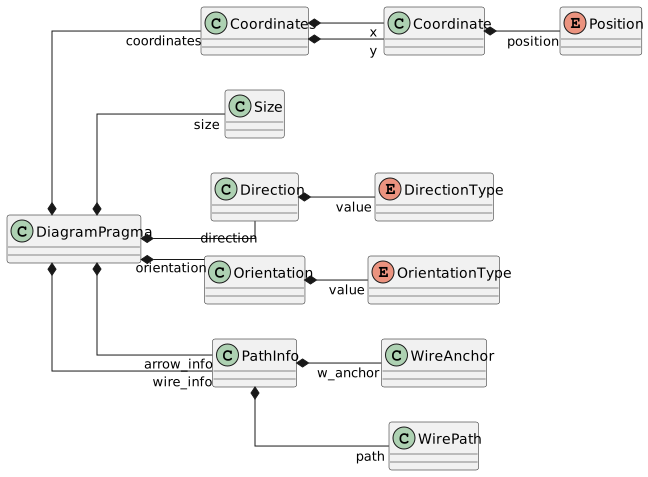
Fig. 19 DiagramPragma class diagram#
Diagram Pragma#
- class ansys.scadeone.core.swan.DiagramPragma#
Bases:
PragmaThe diagram information of a graphical object.
- static filter(pragmas: List[Pragma], key: str, with_key: bool = True) List[Pragma]#
Filters a list of pragmas with/without a given key.
- get_full_path() str#
Full path of the Swan construct.
This method is implemented by derived classes that correspond to a declaration at the module level (such as sensor, type, group, const, operator), or a module itself.
- Returns:
strPath within the owner and name of the Swan construct.
- Raises:
ScadeOneExceptionIf the method is not implemented for the current SwanItem type.
- static set_owner(owner: SwanItem | IModel | None, children: SwanItem | Iterable[SwanItem] | None) None#
Helper to set owner as the owner of each item in the Iterable items.
- property coordinates: Coordinates | None#
Return the diagram coordinates.
- property is_protected: bool#
Tell if a construct item is syntactically protected with some markup and is stored as a string (without the markup).
- property model: IModel#
Return model containing the Swan item.
- property module: ModuleBase | None#
Module containing the item.
- Returns:
ModuleBase: module container, see
ModuleBodyandModuleInterfaceor None if the object is itself a module.
- property orientation: Orientation | None#
Return the diagram orientation.
Coordinates#
Coordinates are used to define positions in the diagram. They represent a point with an absolute or relative position.
The Coordinates class defines a point with its x and y coordinates. A Coordinate
represents a single coordinate, which can be absolute or relative depending on the Position information.
The letters “h” and “v” stand for horizontal and vertical positions, respectively, with capitalization indicating absolute or relative values.
Example: {"xy": "H100,V200"} specifies an absolute position at x=100 and y=200.
Relative values are computed from the center of the parent container. For wires and transitions, they correspond to the center of the source and target elements or the previous coordinate in the path.
- class ansys.scadeone.core.swan.Coordinates(x: Coordinate | None = None, y: Coordinate | None = None)#
Bases:
objectCoordinates define a horizontal (x) and a vertical (y) position of a graphical object.
Coordinates are specified as:
xy = COORD ";" COORD
where:
COORD: Coordinate x or y (seeCoordinate)
Coordinates are used to define the position of the diagram object, states or Active if/when blocks.
- property x: Coordinate | None#
Return the x coordinate.
- property y: Coordinate | None#
Return the y coordinate.
- class ansys.scadeone.core.swan.Coordinate(position: Position, value: int)#
Bases:
objectCoordinate defines a horizontal (x) or vertical (y) position of a graphical object.
Coordinate is defined as:
xy = ("H" | "h")x ";" ("V" | "v")y
("H" | "h")or("V" | "v"): Absolute or relative position (seePosition)xory: Coordinate value
The relative coordinate values are computed from:
the center of the parent block
wire and transition: the center of the source/target, or the previous coordinate
Size#
- class ansys.scadeone.core.swan.Size(width: int, height: int)#
Bases:
objectSize of a graphical object.
Size is defined as
wh = width ";" height
where:
width: Width valueheight: Height value
Size is used to define the size of the diagram object, states, active if/when blocks or automaton. If omitted, the default size of the object is used.
Direction#
- The format is
{"dir": "val"}, where val is one of ne, nw, es, en, se, sw, ws, wn. For example, ne stands for “NorthEast,” nw for “NorthWest,” and so on.
The first letter represents the orientation of the top side of the block instance, while the second letter represents the orientation of its output side. The default orientation is ne, with inputs on the left and outputs on the right. A 90-degree clockwise rotation of the block instance results in a new orientation, while a 90-degree counter-clockwise rotation combined with a flip results in the ws orientation.
- class ansys.scadeone.core.swan.Direction(value: DirectionType)#
Bases:
objectThe direction of the diagram object.
Direction is defined as
dir = dir_val
where
dir_valis defined inDirectionType.Direction is used to define the direction of predefined operator and block with text (Expr, Def, Instance, Equation).
- property value: DirectionType#
Return the direction value.
- class ansys.scadeone.core.swan.DirectionType(value)#
Bases:
EnumThe direction value of a diagram object.
The direction value is defined as
dir_val = ne|nw|es|en|se|sw|ws|wn
where:
ne: North-Eastnw: North-Westes: East-Southen: East-Northse: South-Eastsw: South-Westws: West-Southwn: West-North
The direction value is read as: the first direction is at the top of the graphical object, and the second direction is the right side of the graphical object.
- The default direction is North-East:
West corresponding to inputs,
East corresponding to outputs.
- EAST_NORTH = 'en'#
East-North direction. From the default direction, a 90° left rotation and a horizontal flip are applied (inputs are at the bottom and outputs are at the top).
- EAST_SOUTH = 'es'#
East-South direction. From the default direction, a 90° left rotation is applied (inputs are at the bottom and outputs are at the top).
- NORTH_EAST = 'ne'#
North-East direction. Default direction (inputs are on the left, outputs are on the right).
- NORTH_WEST = 'nw'#
North-West direction. From the default direction, a horizontal flip is applied, or a 180° rotation and a vertical flip are applied (inputs are on the right and outputs are on the left).
- SOUTH_EAST = 'se'#
South east direction. From the default direction, a vertical flip is applied (inputs are on the left and outputs are on the right).
- SOUTH_WEST = 'sw'#
South-West direction. From the default direction, a 180° rotation is applied (inputs are on the right and outputs are on the left).
- WEST_NORTH = 'wn'#
West-North direction. From the default direction a 90° right rotation is applied (inputs are at the top and outputs are at the bottom).
- WEST_SOUTH = 'ws'#
West-South direction. From the default direction, a 90° right rotation and a horizontal flip are applied (inputs are at the top and outputs are at the bottom).
Orientation#
- class ansys.scadeone.core.swan.Orientation(value: OrientationType)#
Bases:
objectText content orientation.
Orientation is defined as
orient = orient_val
where
orient_valis defined inOrientationType.Orientation is used to define the text content orientation of the diagram object.
- property value: OrientationType#
Return the orientation value.
Wire and transition path#
Path information for a wire or transition is encapsulated within a PathInfo object.
This object includes a list of moves that define the path from the source element to the target element.
Additionally, the path may contain multiple targets, which are represented as branches within the path structure.
The grammar for a path is as follows:
LUNUM = '#' [0-9]+
COORD = [hHvV]+ '-'? [0-9]+

path_info = path_anchor path
path_anchor = LUNUM
            | COORD '|' LUNUM
            | coordinate '|' LUNUM
            | coordinate
path = moves path_anchor
     | moves branches
moves =  move *
move = COORD
     | coordinate
     | COORD '|' coordinate
     | coordinate '|' coordinate
coordinate = COORD ',' COORD
branches = '['' path ( ',' path ) * ']'
Where path_info is the path information, starting with a path_anchor and followed by a path. A path consists of a list of moves and ends with a path_anchor or branches.
- COORD:
Defines either an absolute or relative coordinate.
- path_anchor:
Defines the anchor of the path (source or target element), where:
LUNUM: source/target element number
COORD ‘|’ LUNUM: connection to a group-related block
coordinate ‘|’ LUNUM: connection to a state
coordinate: unconnected endpoint
- moves:
Moves are defined as:
COORD: a single move to the next coordinate, either horizontal or vertical
coordinate: move to a given point, which can be absolute or relative
coordinate ‘|’ coordinate: move to a point (first coordinate) for a fork object (second coordinate)
Check the examples from the Scade One distribution to see pragma content and results.
Path information#
- class ansys.scadeone.core.swan.PathInfo(path_anchor: PathAnchor, path: PathPart)#
Bases:
objectThe wire or transition path between two objects. The path is defined by a list of moves.
The wire and transition paths are defined as:
Wire
wp = path_info
Transition
tp = path_info
where:
path_info = path_anchor path
path_anchoris defined inPathAnchor.pathis defined inPathPart.- property path_anchor: PathAnchor#
Return the wire anchor.
Path anchor#
- class ansys.scadeone.core.swan.PathAnchor(lunum: Lunum | None = None, coordinates: Coordinates | None = None)#
Bases:
objectPath anchor is the starting or ending point of a path.
Path anchor is defined as:
path_anchor = LUNUM
    | COORD '|' LUNUM (* connection to a group-related block *)
    | coordinates '|' LUNUM (* coordinates of a starting/ending point of a transition for a state *)
    | coordinates (* unconnected point as a pair of COORD. *)
where:
LUNUM: The graphical object identifier (seeLunum)COORD: Coordinate x or y (seeCoordinate)coordinates: Coordinates (x;*y*) (seeCoordinates)
- property coordinates: Coordinates | None#
Return the coordinates.
Path moves#
- class ansys.scadeone.core.swan.Move(coordinates: Coordinates, fork_coordinates: Coordinates | None = None)#
Bases:
objectThis class manages the moves along wire and transition paths.
A move is defined as:
move_coordinates = COORD | coordinates
for a move along a wire path and a transition path, and is defined as:
move_and_fork_coordinates = (COORD | coordinates) '|' coordinates
for a move along a transition path with a fork. The coordinates before the pipe symbol (‘|’) represent the move, and the coordinates after the pipe symbol represent the fork point.
- property coordinates: Coordinates#
Return the coordinates.
- property fork_coordinates: Coordinates | None#
Return the fork coordinates. Only applies to transitions.
Path part#
- class ansys.scadeone.core.swan.PathPart(moves: List[Move] | None = None, path_anchor: PathAnchor | None = None, branches: Branches | None = None)#
Bases:
objectThe PathPart represents a segment of a path after the anchor or in branch.
The path part is defined as:
path = {move} path_anchor
     | {move} branch
{move} means zero or more moves. where:
moveis defined inMovepath_anchoris defined inPathAnchorbranchis defined inBranch
- property path_anchor: PathAnchor | None#
Return the wire anchor.
Path branches#
- class ansys.scadeone.core.swan.Branches(path_list: List[PathPart])#
Bases:
objectBranch is the graphic path followed by the wire or transition when there are multiple paths.
Branch is defined as:
branch = '[' path_list ']';
path_list = path
          | path_list ',' path
where:
path: path part (seePathPart)